MyJABLOTRON
|
26. 10. 2026
Spot people, cars and animals in a photo at a glance. The app highlights them for you
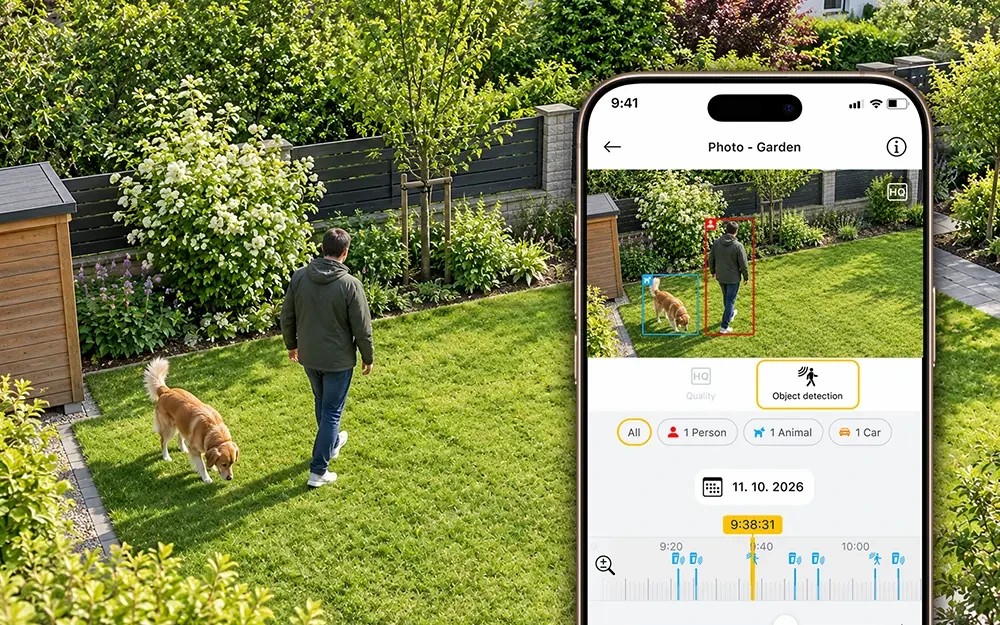
A dog in the garden, a car in the driveway, a stranger at the door. You stay on top of it all. In shots from a movement detector with visual verification, the MyJABLOTRON 2 app now automatically frames the people, vehicles and animals it captures.
People are framed in red, animals in blue. So you can tell at a glance whether the photo shows, say, a dog running around or a person you would not expect there.
The filters show how many objects were found, for example “3 people” or “2 animals”. Tap a filter to highlight just one type; select the All filter to show all frames again.
Highlighting is switched on automatically. If you want to see the plain photo, turn it off with the switch.
How to use it
- In the app, open the fotoPIR detail screen or the gallery in the event history.
- Select a photo. The frames appear right on it.
- In the filters, choose an object type, for example people only.
- For a photo without frames, turn off the Object detection switch.
Good to know
- Older images and photos taken before this feature was introduced have no frames.
- Detection does not work with OASIS control units.
- Object highlighting is available for all JA-100 and MERCURY control units with a JABLOTRON SIM.
Available from version 1.24.0.