MyJABLOTRON
|
13. 10. 2026
See what is happening right away. Motion detector images appear instantly in your notification
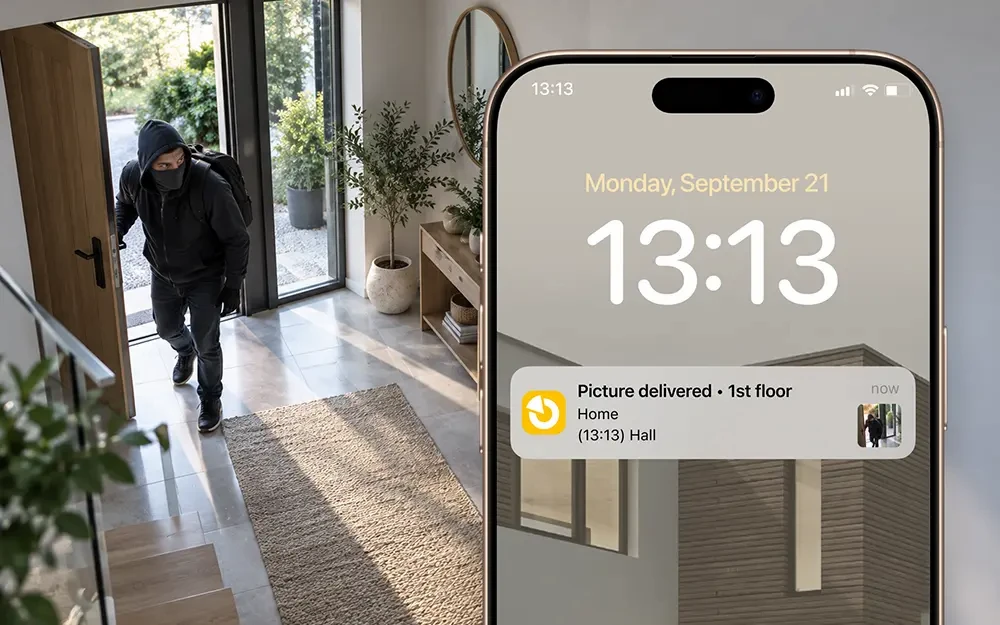
Notifications of a new image from our FotoPIR detector now show the photo straight away. You will know what is happening at the property before you even open the app.
Until now, the notification showed only a line of text, just like other notifications (about arming, disarming, switching on a light or opening a gate). To see the image itself, you had to open the app.
Now the photo is right in the notification preview. At a glance, you can tell whether a cat has crossed the garden or whether it is a situation you need to deal with quickly. When you press and hold or expand the notification, the image is shown in a larger format. Other notifications remain text-only.
The image is not lost even after you delete the notification. You can find it in the app in the Notifications section, in the event history and in the gallery. Tap to view the photo in full resolution.
You do not need to set anything up. The image appears in the notification automatically after you update the app.
What can the image in the notification do for you?
- You can tell a false alarm from a real one without opening the app.
- When you are away from the property, you can see straight away what the detector has captured.
- You can also look at the image at your leisure later.
Good to know
- The image in the notification is available for all JA-100 and MERCURY control units, but only with a JABLOTRON SIM card.
- The Notifications section is cleared automatically.
- You can still find the images in the event history or the gallery.
Available from version 1.24.0.