MyJABLOTRON
|
15. 1. 2026
Important data on temperature and consumption directly in the app. Take advantage of backups and keep track

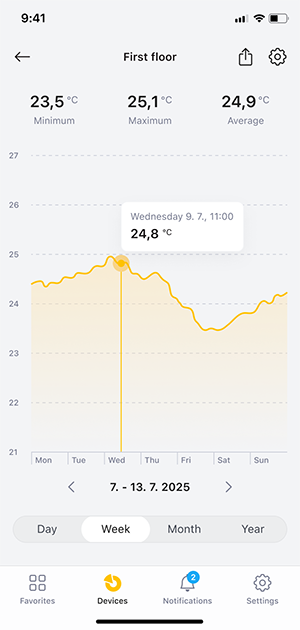
Back up temperatures and energy consumption quickly and easily. The export function in the MyJABLOTRON 2 app allows you to conveniently archive data, easily share it as a basis for reports, and analyze it in detail for better control of operations.
What does the data export function offer?
It allows you to export recorded temperature data and energy consumption information to CSV format, which is compatible with most spreadsheet editors.
What can you use the export for?
- Data backup: Your data will be stored securely outside of MyJABLOTRON 2. You will find the data directly in the app for a maximum of 3 years.
- Detailed analysis: You can easily evaluate trends and deviations in temperatures and consumption. For example, you can compare multiple time periods or compare devices with each other.
- Audit support: You can quickly prepare documentation to prove that the device is operating correctly and meeting standards.
How to export data from the application?
- Select the thermometer or consumption measurement device from which you want to export data.
- Display the temperature/consumption curve in the graph and select the time period (day, week, month, or year) for which you want to obtain data.
- Click the "Export" button at the top of the screen and confirm with the "Download" button.
- The data will be downloaded in CSV format – you can save the file to your phone, to a shared folder, or send it directly by email.
Available from version 1.14.0.